← Mr. Zeolla's Math ShopStart free on ZPath
New from Mr. Zeolla's Math Shop

Every Standard. Every Prerequisite Skill.

ZPath is online math practice for 5th grade through Geometry. New numbers every time, instant checking, step-by-step help, ready-made tests, online mazes, and Class Battles your students will beg for. Free to start.

Founding Teacher Pricing: Pro is $99/year, locked in for life if you join by June 30, 2027. See pricing ↓

Algebra 2 coming soon

5th–Geoevery standard
Everypre-req skill, in order
34ready-made unit tests
5Class Battle styles
Mazesonline + printable

Built by a teacher, for real classrooms

I teach math in New York. I built ZPath for my own students: practice they can't copy, that checks their work, and that helps them when they're stuck. Then I tested it with my class.

For teachers

Assign exactly what your class needs

Pick a standard, see every skill that leads up to it, and assign the whole path or just the steps you want.
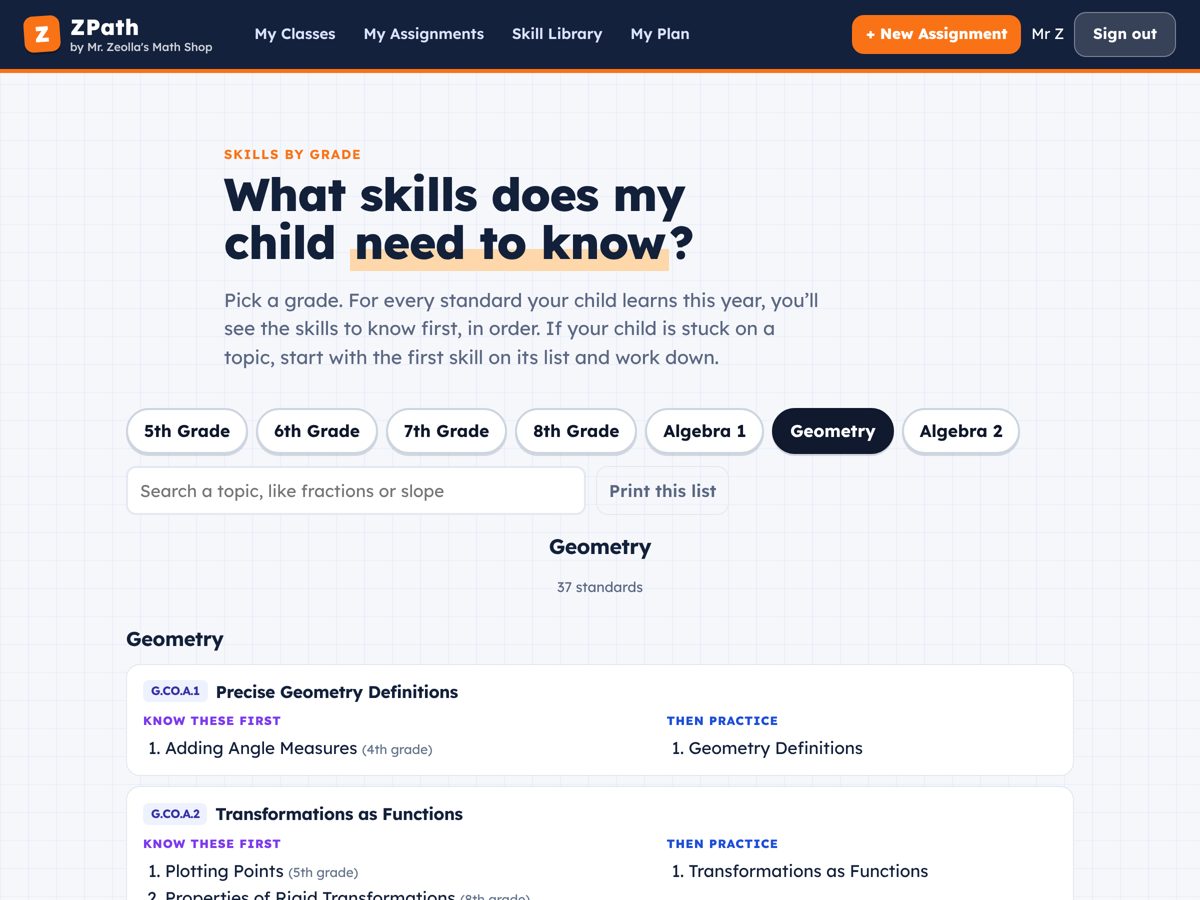
ZPath skills by grade, with the skills to know first for each standard.
Skill Library

Every standard, with every pre-req

Browse 5th grade, 6th, 7th, 8th, Algebra 1 and Geometry. Each standard lists the skills students need first, in order, and pre-reqs are shown in a different color.

  • Search by standard or skill, like 7.NS or unit rate.
  • Try any problem yourself before you assign it.
  • Each step gets its own checkbox, so you assign only what you want.
You choose

Pick the kinds of questions, or the exact ones

Every skill has format buttons: Mixed, Just the Math, Tables, Graphs and Word Problems. Turn on one or several, for every skill where it fits. For constant of proportionality, ask it from a table, a graph or a word problem, or mix them. Or hand-pick the exact questions every student gets.

Free on every plan. See how it works →

  • Multiple choice, typed answers, or a mix. You set the counts.
  • Practice until they get X right, or a set number of questions.
  • Make showing work required: no work, no checking.
  • Share any assignment to Google Classroom with one button.
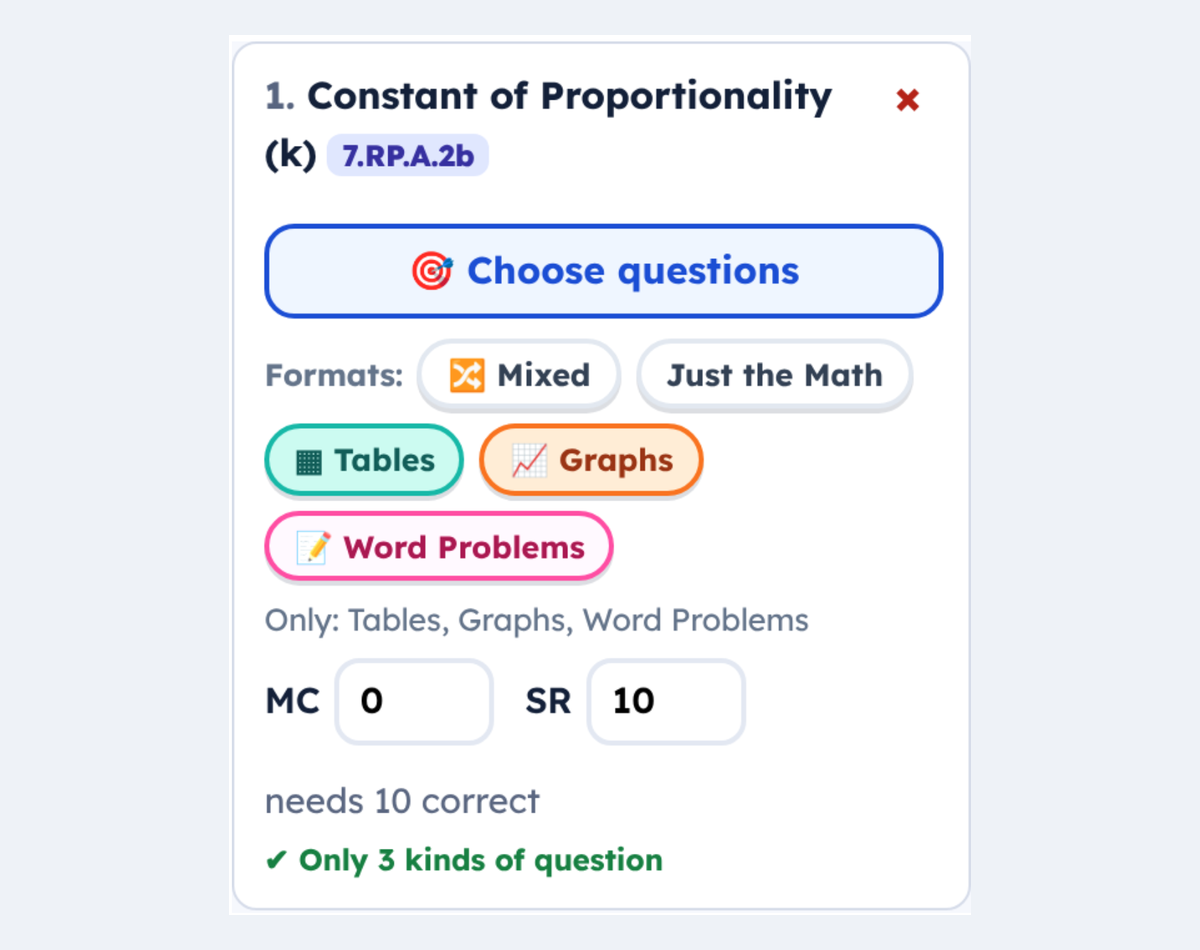
ZPath format buttons for constant of proportionality: Mixed, Just the Math, Tables, Graphs and Word Problems.
New

Mixed Practice for test review

Check one box and ZPath adds a last step that shuffles every skill in your assignment into one set, using the formats you picked for each skill. Just like the real test.
For students

Practice that helps, and can't be copied

Students sign in with a class code, tap their name and enter a PIN. No student email needed.

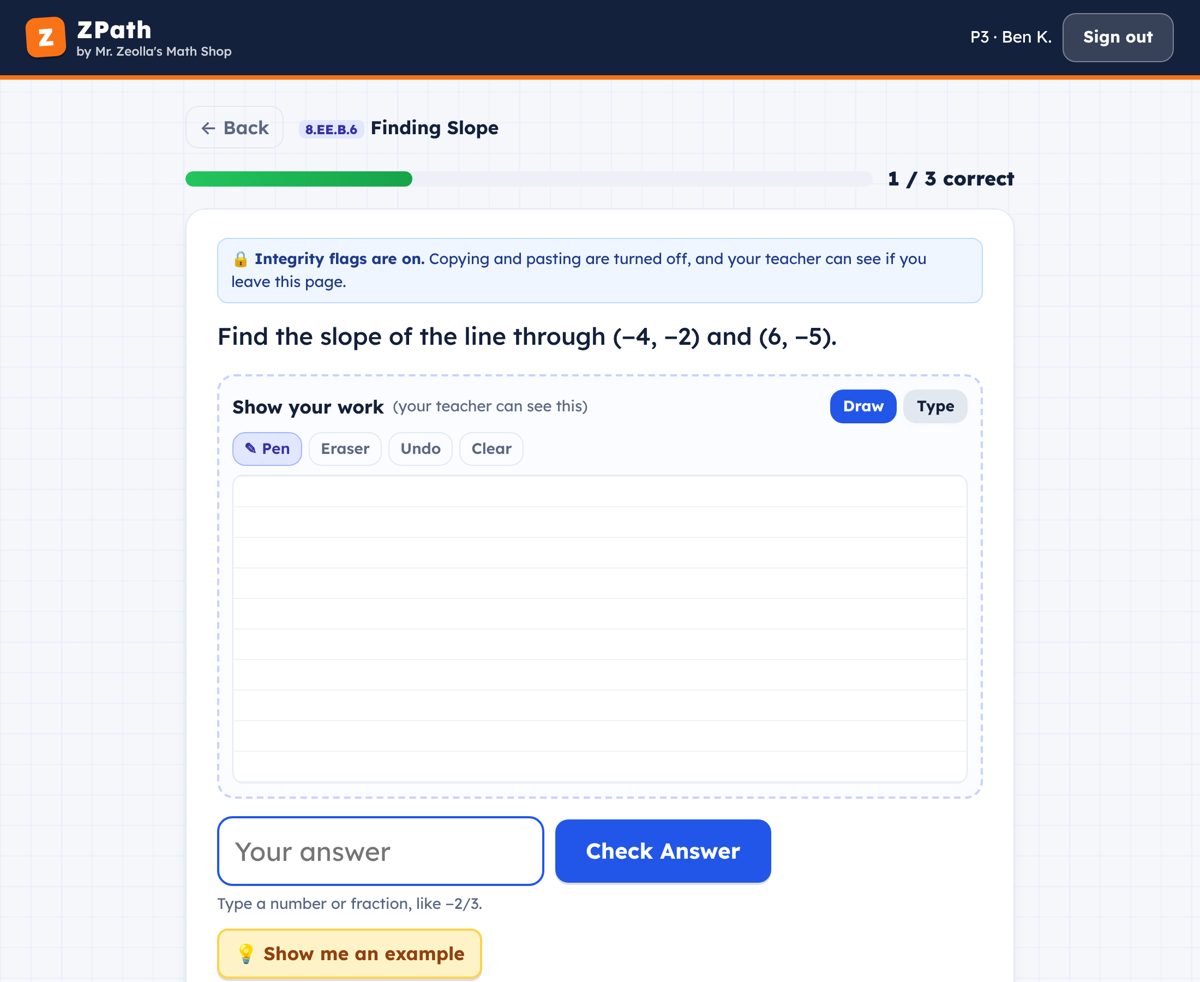
A ZPath student question with a show-your-work pad and integrity notice.
Show your work

A work pad right on the screen

Students draw or type their work, then answer. Every problem has new numbers, so answers can't be shared.

  • Copy and paste are turned off.
  • Integrity flags: you see who left the page and on which problem, plus answers that came in very fast.
  • Works in any web browser: Chromebook, iPad, laptop or phone.
Help, even at 9 pm

Step-by-step help on every question

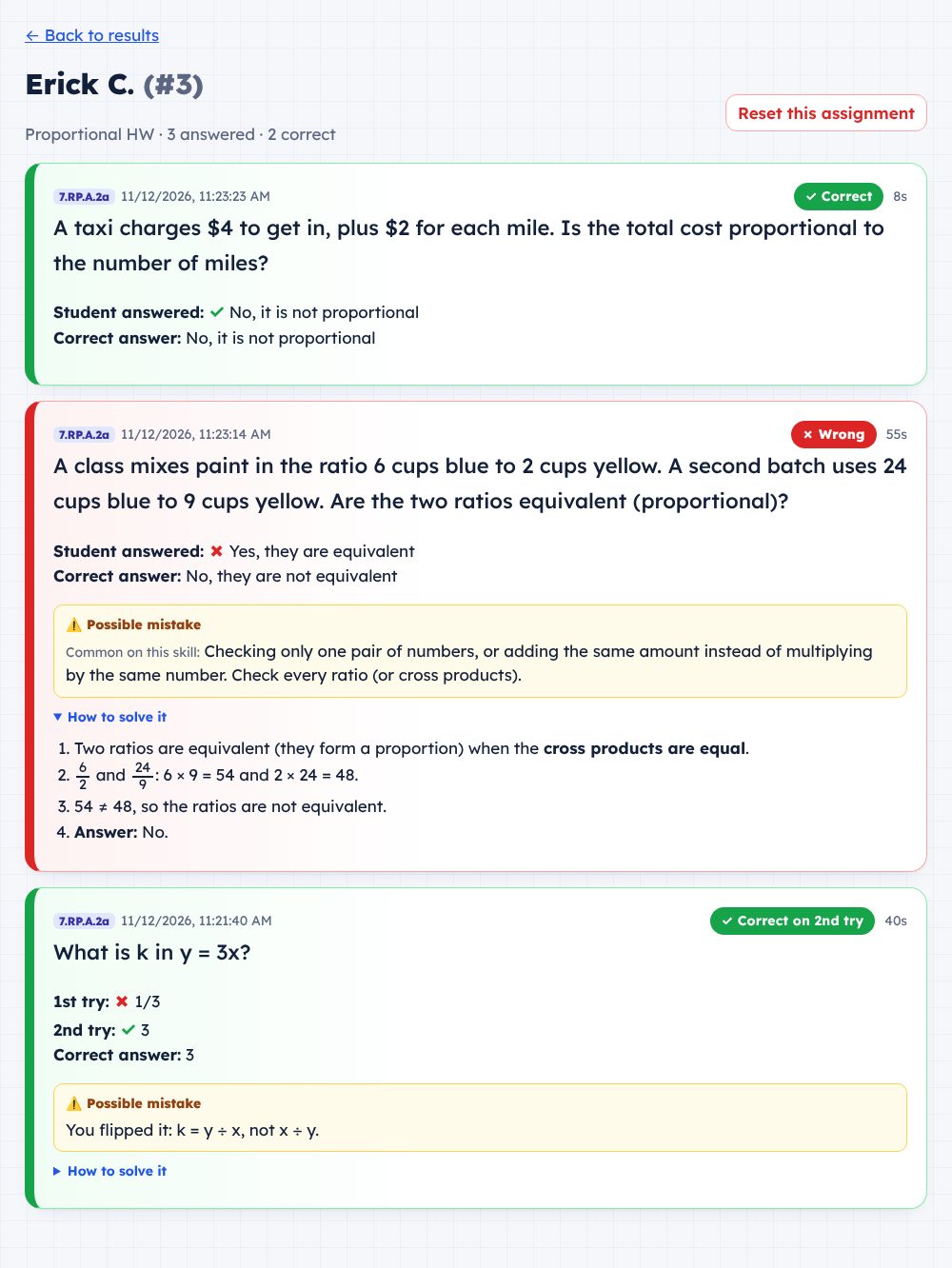
When a student misses, ZPath shows the worked steps. If the wrong answer matches a common mistake, it tells them exactly what they did, like flipping a fraction or mixing up radius and diameter.

  • "Show me an example" button on every problem.
  • Multiple choice gets 1 try; typed answers get 2.
  • Stuck students get pointed to the pre-req that will help.
A ZPath student result showing a possible mistake and the steps to solve.
Class Battles

Math games where guessing doesn't pay

Run a live battle on any skill. Wrong answers freeze a student for 3, then 6, then 9 seconds, so the fastest guesser doesn't win.

🏁

Race

First to the goal number of right answers wins.

🪢

Tug of War

Each right answer pulls the rope your way.

⏱️

Timed Sprint

Most right answers when the clock hits zero wins.

❤️

Survival

Everyone starts with lives. Last one standing wins.

👥

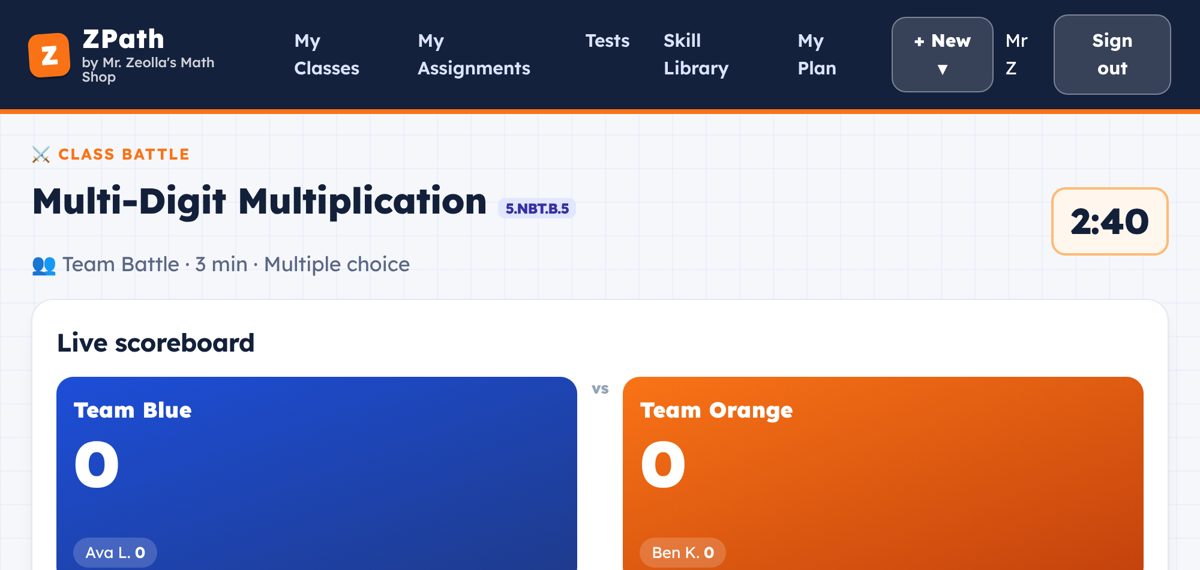
Team Battle

The class splits into teams. Every right answer counts, and each student gets different questions, so no passing answers.

A ZPath Team Battle scoreboard, Team Blue vs Team Orange.
Run it your way

1-on-1, teams, or the whole class

Pick up to 5 standards. Questions take turns between them. Set the time (1 minute and up, or your own), and multiple choice or typed. Build teams by dragging names, or let ZPath even them out.

  • Live scoreboard on your screen.
  • Odd number of students? The extra one plays Z-Bot (Easy, Medium or Hard), or you play them yourself from your screen.
  • Z-Bot misses some questions and gets frozen when it does, just like students.
  • Students get a work pad during battles too.
  • Battle stats on every student's page, plus an All battles list.
After the battle

Review every mistake

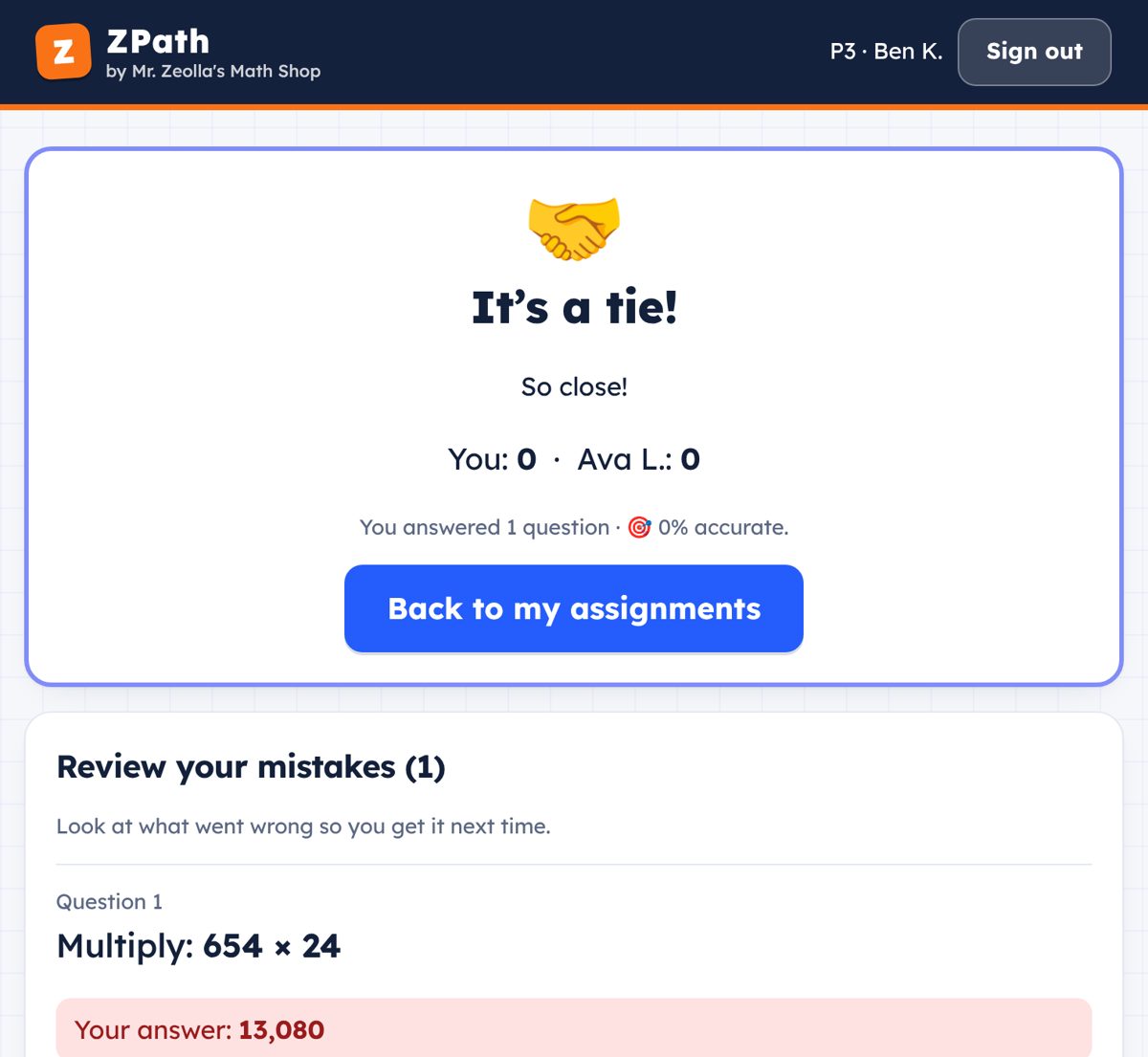
When the battle ends, students review what they missed with the steps. You see each student's work and the most missed questions.

  • Click any student to see their answers and work.
  • See which standards each battle covered.
  • Free accounts get 3 battles; Pro is unlimited.
A ZPath battle result with a review of mistakes.
Mazes

Math mazes, online and on paper

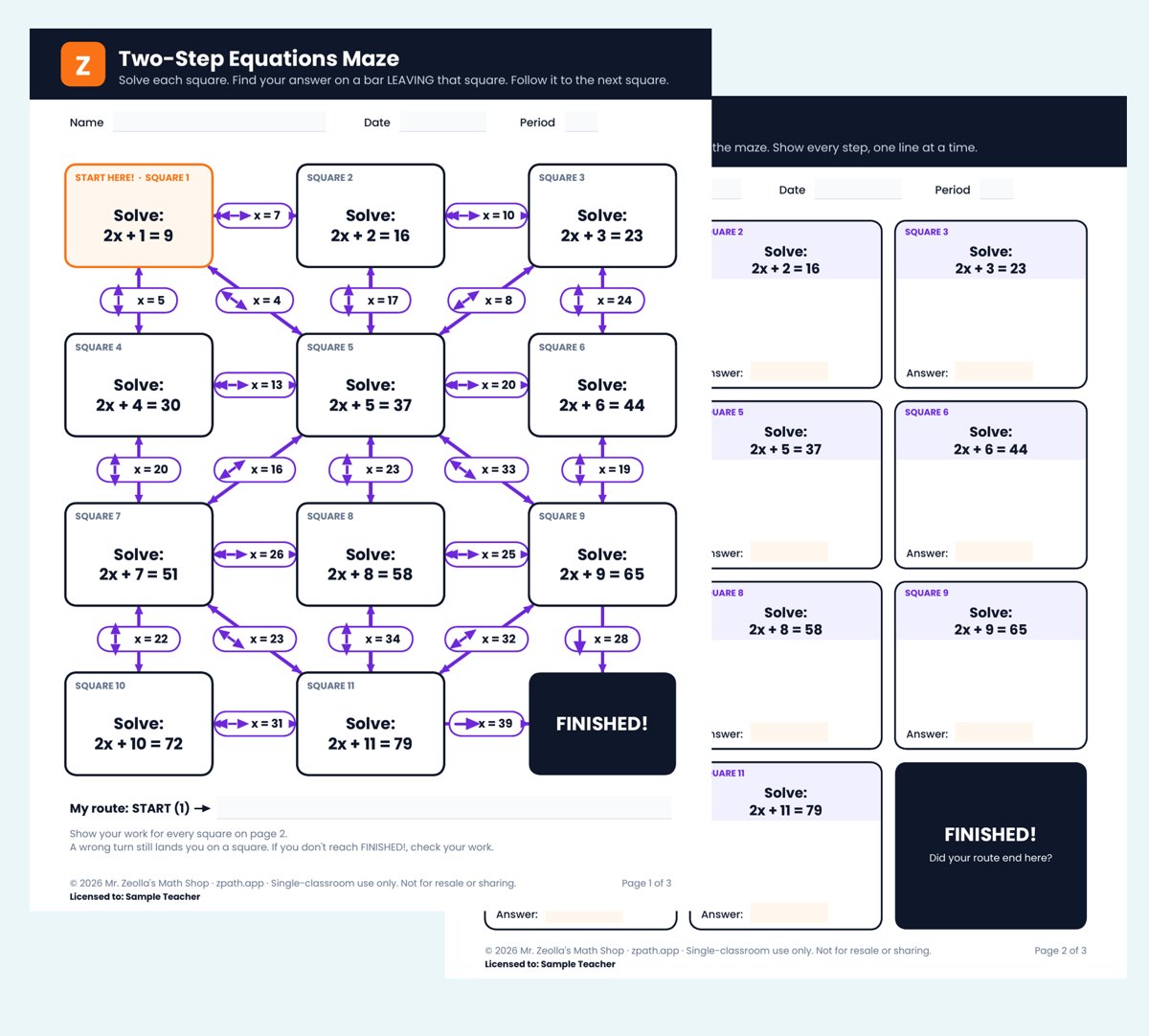
Students solve each square and follow the right answer through the maze. Every wrong turn costs 10%, so guessing doesn't pay.

A ZPath Maze PDF: the maze page and the work-space page, with the no-resale footer.
Online and printable

Assign a maze, or print one

Every maze is built from the skill you pick, with new questions each time.

  • Online Mazes: assign one as homework or classwork. A retake gives a brand-new maze.
  • 1 v 1 Maze Battles: two students race through the same maze. First to FINISHED! wins.
  • Fillable Maze PDFs: the maze, a work-space page for every square, and an answer key.
  • Free accounts get 1 Maze PDF to try. Mazes are included in Founding Pro and Family.
Student work & data

See every answer, every step

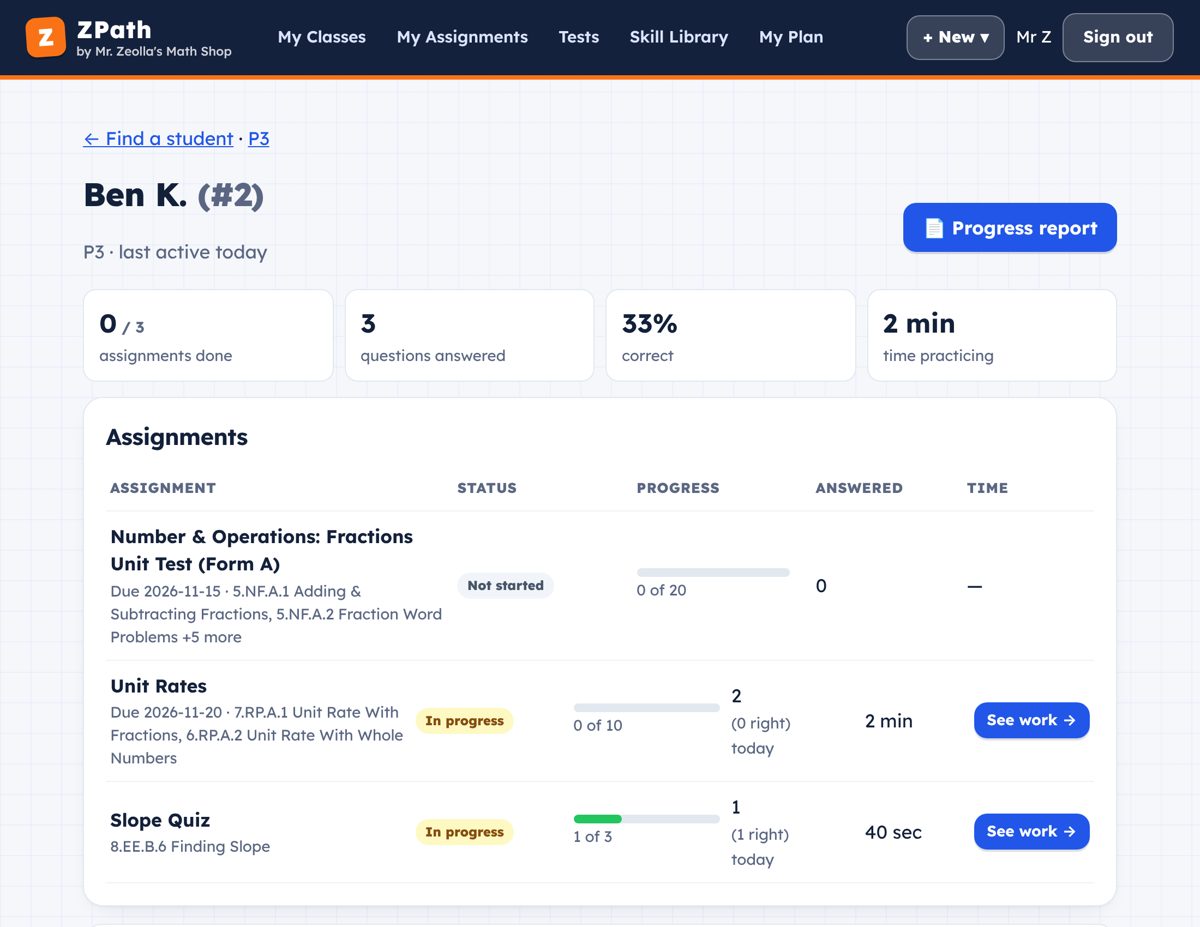
Search any student and see all of their work, right and wrong, with the time they spent.

A ZPath student page with assignments, progress and class battles.
Find a student

Everything about one student, on one page

Assignments, progress, time spent, battle record and standards, all in one place. Reset an assignment any time.

  • See which students need attention first.
  • Print a progress report or save it as a PDF to send home.
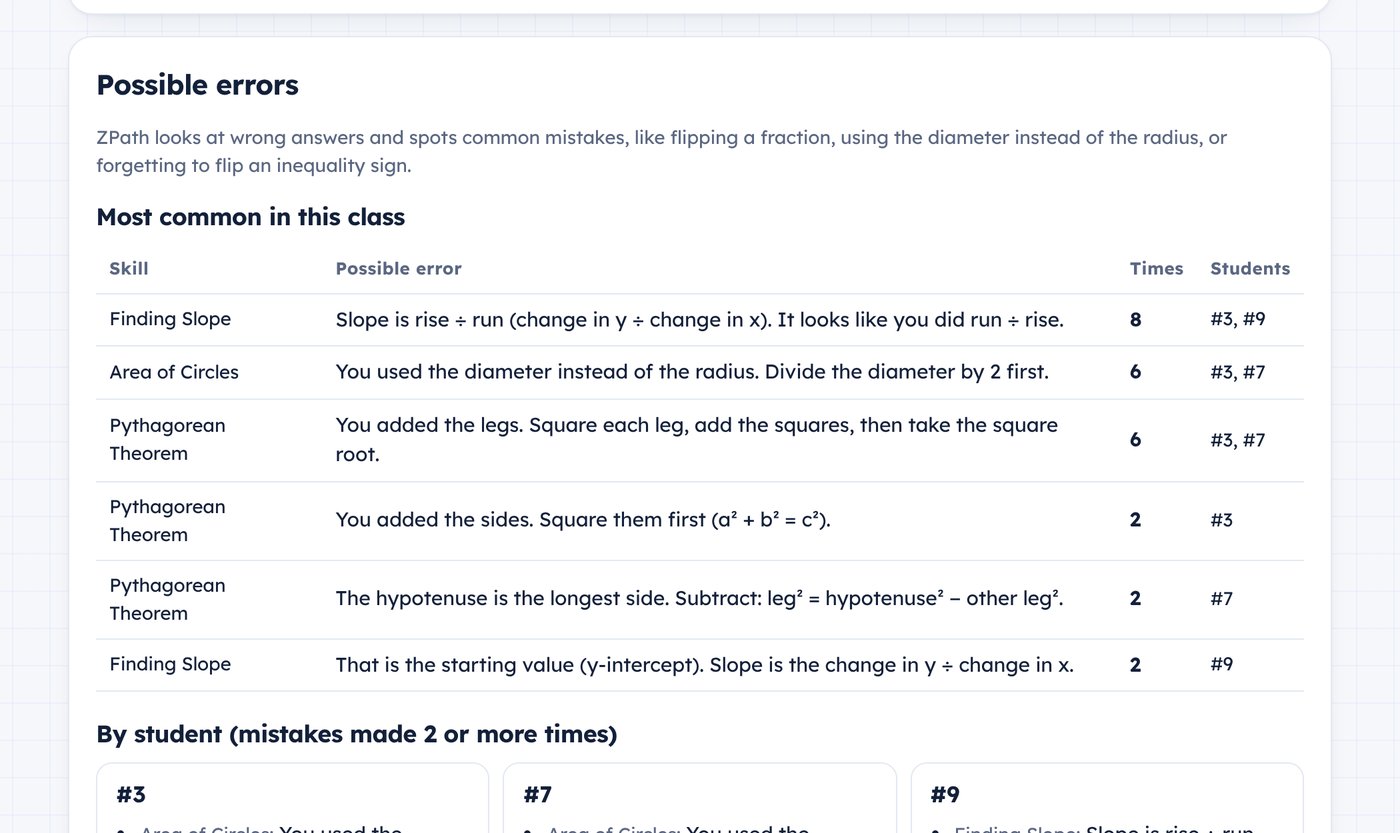
Possible mistakes

The mistake your whole class keeps making

ZPath groups wrong answers by the mistake behind them, so you know what to reteach tomorrow.

  • Top mistakes for each class and skill.
  • See which students made each one.
ZPath report listing the most common mistakes in a class.
New

Scores by format

Your results page splits every student's score by question type (Just the Math, Tables, Graphs, Word Problems, Mixed Practice), so you can see whether a student struggles with the math itself or with reading a table, a graph or a word problem.

Tests & reports

Tests and data, ready to go

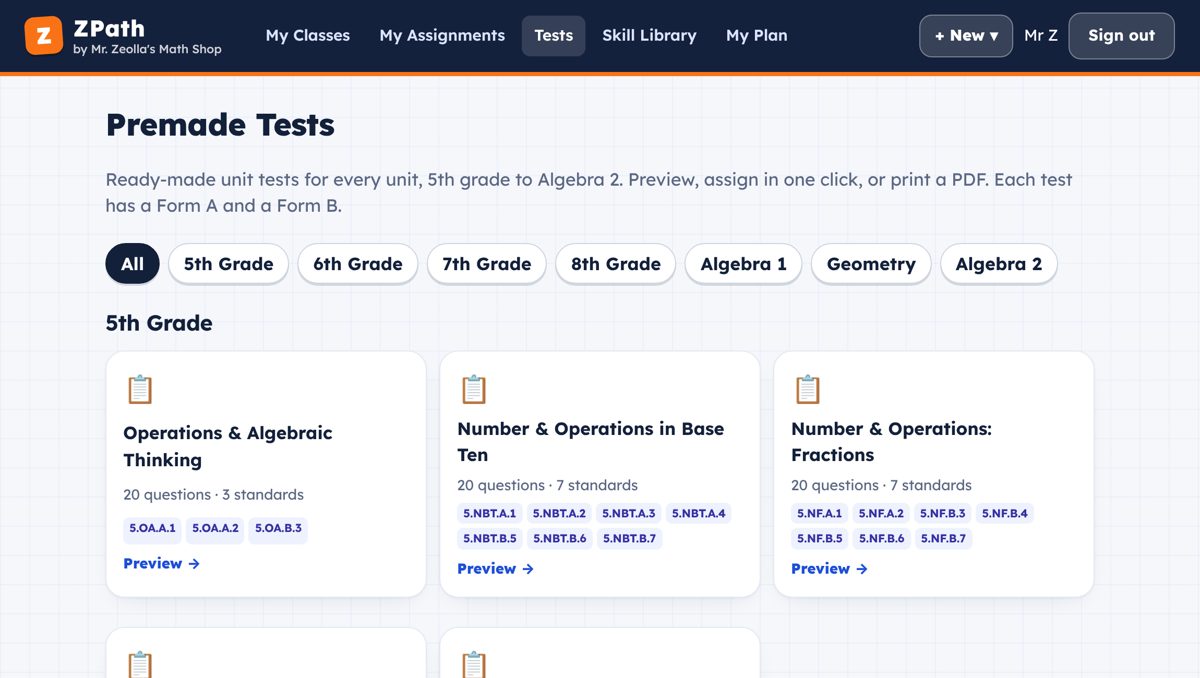
34 ready-made unit tests, 5th grade through Geometry, each with a Form A and Form B.

ZPath premade tests by grade.
Premade tests

Use them as they are, or make them yours

Preview any test, assign it in one click, or print it. Customize a test to swap, add and remove questions.

  • Form A and Form B for every test.
  • Print any test or assignment with work space.
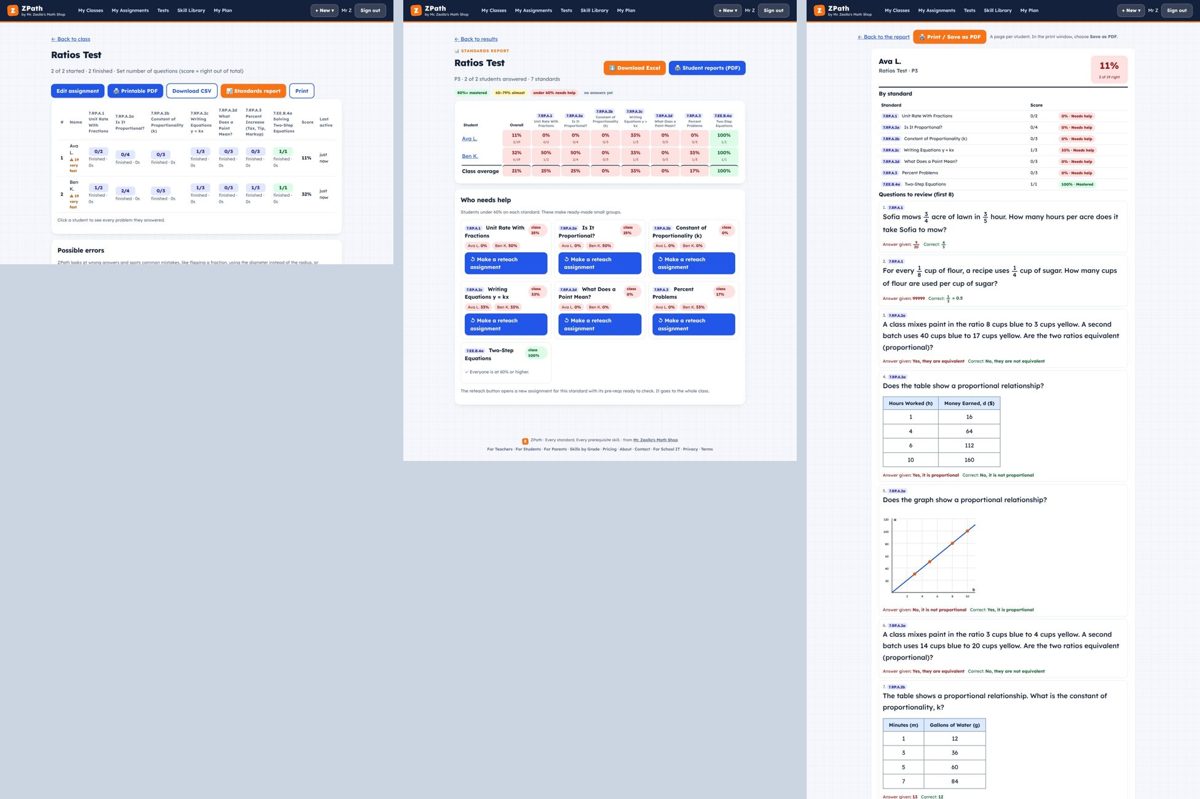
Reports

Standards report for every test

After a test, download a report with each student's score on every standard, in Excel or PDF.

  • Reports tab: data by class, student, assignment and battle.
  • Download class reports as Excel.
  • Progress reports for families.
A ZPath standards report for a test.
Parents, homeschool & tutors

Not just for classrooms

Parents, homeschool families and tutors use ZPath the same way teachers do.

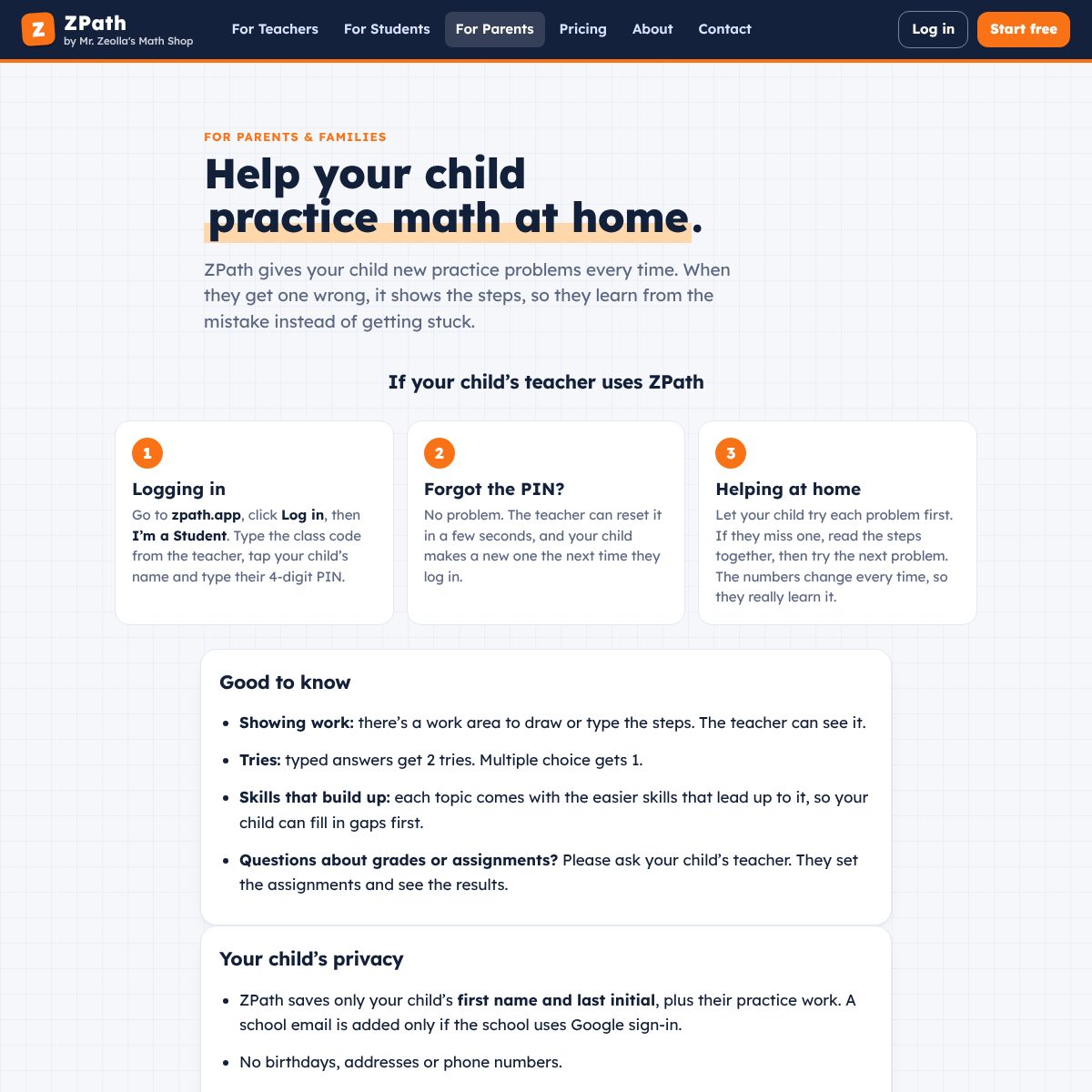
The ZPath For Parents page.
For parents

Know exactly what your child needs

The For Parents page shows every standard for your child's grade and the skills that come first, so you know what to practice at home.

  • Family plan: up to 5 children for $50 a year, mazes included, price locked in.
  • See your child's work and progress.
  • Step-by-step help when you're not sure how to explain it.
Videos

See it in action

Short videos of each feature. Tap one to play.

Every pre-req, in order

Pick the questions every student gets

Multiple choice, typed, or both

Class Battles

No copy, no paste

Step-by-step help

The mistake your class keeps making

New numbers for every kid

Practice until they get it

Make showing work required

Founding Teacher Pricing

Join by June 30, 2027 and your price never goes up, for as long as you stay subscribed.

Free

$0
  • 5 assignments
  • 3 Class Battles
  • 1 Maze PDF
  • Every standard, every pre-req
  • Pick question types + Mixed Practice

Founding Pro

$239.88$99/yr
Save $140.88 vs monthly

or $19.99/month

Locked in for life. Next school year Pro goes up to $199/year. Founding teachers keep their price.
  • Unlimited assignments and Class Battles
  • Online Mazes, Maze Battles, Maze PDFs
  • Tests, reports and every new feature

Family

$50/yr
Founding price locked in while you stay subscribed.
  • Up to 5 children
  • Unlimited practice
  • Mazes and battles at home

Department

$750/yr

Up to 10 teachers, $75 each

Whole school

$1,500/yr

Every math teacher. Purchase orders accepted.

See full pricing on ZPath

Family and Pro Yearly renew every year; Pro Monthly renews every month. Cancel any time. School quote? Email [email protected]

Questions

Is it really free?

Yes. A free account gets 5 assignments, 3 Class Battles and 1 Maze PDF, with every standard and every pre-req. No credit card.

What grades does it cover?

5th grade, 6th, 7th, 8th, Algebra 1 and Geometry. Algebra 2 is coming soon.

Do my students need email addresses?

No. You paste your roster (first name and last initial), and students sign in with a class code, tap their name and enter a PIN.

Does it work with Google Classroom?

Yes, you can share any assignment to Google Classroom with one button. Importing a whole class from Google Classroom is coming soon.

What devices does it work on?

Any device with a web browser: Chromebooks, iPads, laptops and phones. Nothing to install.

The site is blocked at my school. What do I do?

Send your tech team the For School IT page. It lists what to allow.

How do students stop using AI or copying answers?

Every student gets different numbers, copy and paste are turned off, and you can see who left the page. You can also require students to show their work.

What does "locked in for life" mean?

If you join Founding Pro or Family by June 30, 2027, your plan keeps renewing at the price you signed up at for as long as you stay subscribed. If you cancel and come back later, the price at that time applies.

Can I cancel?

Any time. Yearly plans renew each year and Pro Monthly renews each month until you cancel.

What about student privacy?

Read the ZPath Privacy Policy. Student information is never sold or used for ads.

Try it with your class this week

Free account, no credit card.

Start free on ZPath